
Less manual work. The same team. More done.
Documents without manual entry — more time for real work.
Documents are not just scanned. They enter a working process: the system prepares the record, status, and next action, while a person reviews exceptions.
What you order
What you can order
You order a working document route — not a field scanner. PDFs, photos, email, and chats are inputs. The system prepares a structured record, applies CHECK where data or rules are missing, and writes to your tables and working system. No manual entry — people review exceptions. Status, history, and next action stay visible for control and reporting.
First — a review of your process. If the route makes sense, we build it for your situation.
If you recognise this — we should talk
- people copy amounts, dates, counterparties from PDFs, photos, email, or chats — retyping, not reviewing
- document statuses are hunted in chats
- files are copied from old templates
- errors are found after something was sent
- one person “remembers” where everything lives
Who this is for and what they get
Business owner
- document status without “where is that file?”
- control over bottlenecks
- less dependence on one person’s memory
Accounting / documents
- fields are not retyped by hand
- disputed or incomplete documents go to CHECK
- people review instead of hunting every amount in a PDF
Sales / managers
- no waiting for someone to find the file
- document status is visible
- clearer view of what happens next
Supply / operations
- documents, statuses, and owners in one route
- status and clarifications are not scattered across chats
- easier to see where the process stopped
What is done by hand today
- someone opens the PDF, photo, or email
- searches for amount, date, counterparty
- copies into a sheet or system
- status lives in chat
- errors show up late
What disappears from your team's day
- the system prepares a structured row
- CHECK stops incomplete data
- a person reviews before any outward action
- status and owner are visible
- data stays structured for sheets, systems, or reports — and for spotting patterns later
What the business gains
- manual field rewriting is removed
- data search shrinks to review
- status does not live in chats
- errors are caught earlier
- the owner sees the picture without extra questions — and can later spot bottlenecks in the document flow
What the result looks like
Instead of a PDF stack and chat threads — one record in a working route: the document becomes data, status, and an owner; CHECK flags gaps; after review, data goes to your tables and working system. History stays for control.
Example result logic: document → structured data → CHECK or ready → status → owner → sheet / CRM / BAS / report.
Anonymised mockup — not client data.
- document_id
- DOC-2026-0142
- date
- 2026-05-28
- counterparty
- Example LLC
- amount
- 48,200 UAH
- status
- CHECKfor human review
- owner
- O. Kovalenko
What it looks like inside
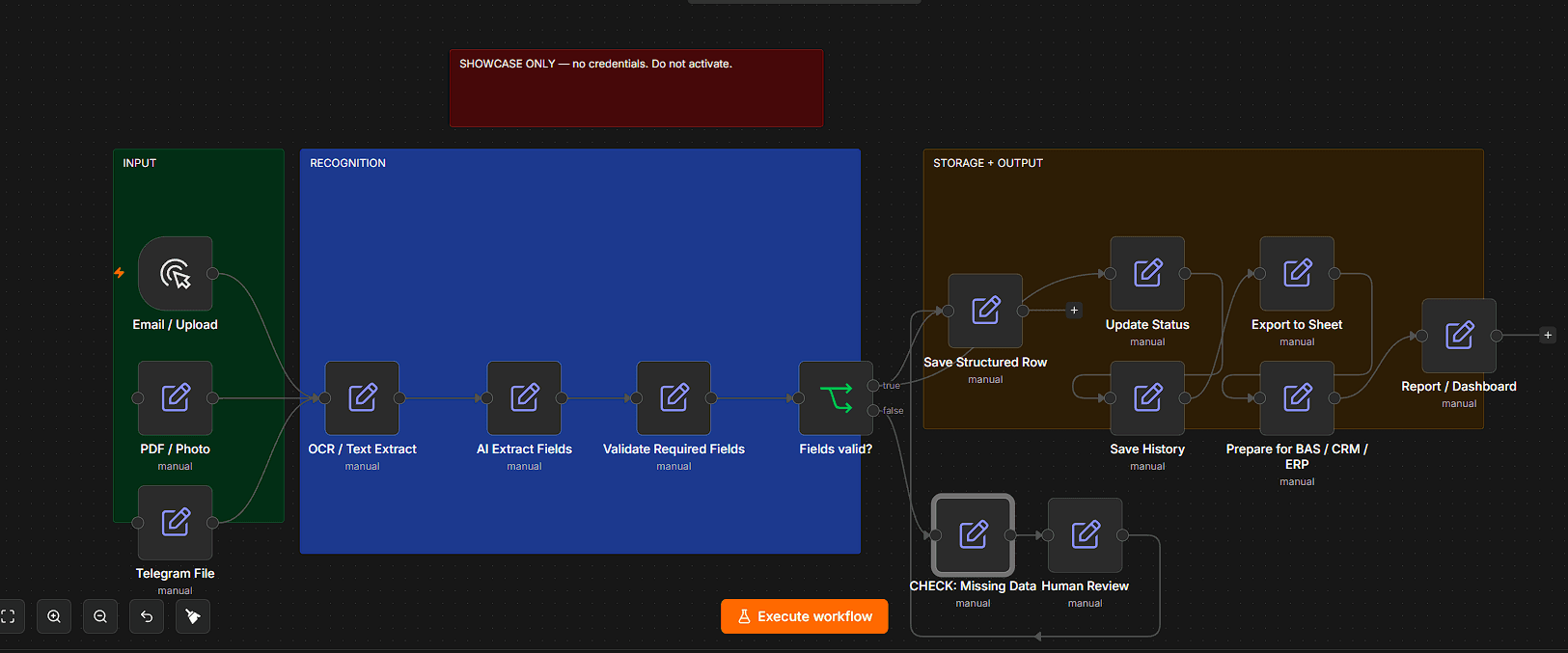
Anonymised technical view of the route. The screenshot shows process structure, not client access, rules, formulas, prompts, or internal logic.
After launch
- Process map — not a black box
- Documentation and support when fields change
- Handover to another specialist is possible
CHECK is not a system failure
CHECK means the system is missing data, a rule, or a human decision. The system does not invent the answer. It stops and shows what needs review. For documents, this may be a missing amount, date, counterparty, or file.
People stay in control
The system prepares the record, status, and next action. People do not retype documents — they review exceptions (CHECK) and confirm handoff to the system.
- CHECKthe system does not invent the answer — only what is described
- CHECKa person reviews before action; auto-send is off
- CHECKCHECK and ready are different statuses
What we do not promise
We do not sell a magic button. The system does not invent the answer — CHECK shows what needs review. A person decides.
- We do not replace an accountant or lawyer
- We do not promise 100% error-free output
- We do not connect BAS, CRM, or other systems without a process review
- We do not automate chaos — a clear route comes first
- We do not send data outward without human review
Show us where the time goes
Send an example: which documents arrive, who still copies fields by hand, and where mistakes cost you time.
First step — process review.
You can also find Denys Rudolf / Rudolf Systems on LinkedIn, Facebook, or X/Twitter.